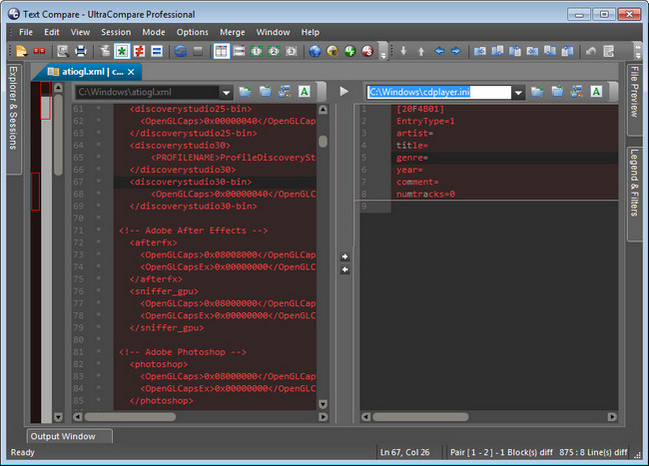
A complement to your file management suite, UltraCompare Professional is loaded with features to enable you to compare text files and folders, as well as zip files and jar archives. Text file compare features include binary and text compare of two or three text files at a time, with the ability to merge text differences between compared files. Folder compare supports comparison of local/network directories (and subdirectories with recursive folder compare) and zip file compare as well, and like text/binary compare, you can merge differences between compared directories. With automatic integration with UltraEdit or UEStudio, UltraCompare Professional is a compare tool you should not be without!
FEATURES -
· Powerful 3-way text compare
· Shell Integration (right click menu in Windows Explorer)
· Ability to edit line and merge within UltraCompare
· Copy/paste multiple selected contiguous lines to clipboard
· Copy frame to clipboard
· Ability to see whitespace differences (tabs and spaces)
· Set Tab value to a specific number of spaces (like UltraEdit-32/UEStudio)
· Bookmark support
· Ability to delete lines from file
· Line-by-line comparison of individual files
· Status bar shows number of lines/blocks with differences
Difference Summary includes:
· data in source but not in destination file (or vice versa)
· character differences between files on the same line
· Command Line Support
Ignore options:
· Ignore case
· Ignore spaces
· Ignore blank lines
· Line terminator differences
· Lines which begin with...
· Lines which contain..
· Lines which end with...
· A defined number of lines at the beginning of file
· A defined number of lines at the end of file
· EBCDIC compare supported
· Double-byte compare supported
Folder Compare Features:
· 3 Way Folder Compare
· ZIP Archive Compare
· ZIP file password support
· Support for RAR compressed files
· Side-by-side Compare Presentation
· Shell Integration
· Split screen to preview text in one pane while moving from file to file
· Option to compare files just on the basis of time/date/size
· Ability to set a NOT operator for filter, ie, NOT *.bak, etc.
· Provide live update on progress (useful when working with large nestedtrees)
· Favorite files and folders now allows quick access to commonly used items
· Explore source or destination folder by right click in folder mode
· Compare individual directories
· Recursive compare of directories (includes subdirectories)
Difference Summary includes:
· Same named files with different sizes
· Same named files with different creation dates/times
· File type: Binary or ASCII
· Compare two folder structures and indicate which files have different permissions
· Ability to select files with different names and compare them
· Ability to right-click on column headings and select fields
Word Compare Features:
· Compare Microsoft Word documents
· Compare RTF Files
Fast Binary Compare Features:
· Binary comparison allowing for shifted data
· Command Line invocation
· Option to display decimal offset rather than Hexadecimal
Merge Features:
· Undo merge feature
· Merge compared lines/blocks between files for 2 and 3 way compare
· Merge compared files between directories for 2 and 3 way folder compare
· Selected line merge capability
· Accept all (or Merge All) button for text mode, and folder mode
· Word-level (or selection-level) replacement and insertion
· Mark merged lines for review
· Enhanced merging - allows changes to be added to changes in other file
· Merge contents of compared directories
· Option to automatically move to the first difference when loading
· Option to automatically move to next difference after merge
Print/Output Features:
· Ability to use UC in batch files to produce reports, side-by-side difference output
· Print right/left file from File menu
· Print difference summary showing matching lines or differences only
· Print and save differences in context
· Print and save differences of one file
· Print and save files side by side
· Print and save differences from binary compare
File Management Features:
· FTP support
· Open Left/Right File independently
· Drag and drop from Explorer
· Close All in the file menu and as a button
· Automatic file change detection
Display Features:
· Integrated IE Browser Support - Display your HTML files as they would appear in the browser
· Show File in Browser
· Text Relational Lines Mode
· Full width display of active line of each file at bottom of application
· Ability to word wrap files
· Graphical scrolling display to easily locate changes
· Synchronized horizontal scroll
· Flip frames to switch source/destination files/directories
· Toolbar customization
Miscellaneous Features:
· User Profiles for allowing different settings for different modes
· Set UltraCompare to single instance
· Check for updates
· Set Filter to specify file types to be displayed during Folder compare
· Configurable Key mapping
· Set font for compare panes
· Customize/Manage toolbar/menu
· Command line option for quick difference check
UltraCompare Lite Features:
· Text Compare
· Support for line-by-line comparison of individual files
· Status Bar shows number of lines/blocks different
Difference Summary includes:
· data in source but not in destination file or vice versa
· data difference between files on the same line
· Fast Binary Compare
· Runs only from within UltraEdit
· Online HTML Help

Or
Wait 5 Seconds after click Skip AD